
Overview & design process
Gym management challenges & operational problem
AllUp Pro is a comprehensive platform tailored for fitness businesses, aiming to streamline administrative tasks and enhance the overall experience for fitness professionals and their clients. Before AllUp Pro, growing gym networks struggled with three operational bottlenecks:
- Disconnected Multi-Gym Operations: Managing brands, gyms, classes, courts, memberships, and retail products across separate tools created data silos for Super Admins.
- Complex Class & Trainer Scheduling: Coordinating onsite and online sessions, recurring weekly time slots, and instructor availability required switching between disconnected screens.
- Fragmented Lead Tracking, POS & Reporting: Front-desk staff lacked a unified workspace to convert leads, sell supplements over the counter, book classes, and audit attendance.
15-week UX design process (W1 – W15)
Based on business requirements and problem statements identified through research and interviews, I structured the UX/UI lifecycle into four overlapping phases across 15 weeks:
- Discover & Understand (W1 – W6): Audited daily gym workflows with owners, front-desk operators, and trainers across memberships, class scheduling, lead pipelines, and POS sales.
- Research & Brainstorming (W3 – W9): Mapped the SaaS information architecture across Main, General, Sales & Promotions, Schedule, and Configuration modules.
- UX & Visual Design + Prototyping (W6 – W15): Crafted the reusable AllUp Pro component system, high-fidelity screens, and interactive prototypes validated with real operators.

Components & modular design system
Navigation architecture, Super Admin controls & analytics widgets
Before scaling into full feature screens, we assembled a modular UI component library engineered for high-density daily club administration:
- Collapsible Dark Sidebar Navigation: Supports both full-label navigation (Dashboard, Classes & Coaching, Orders, Videos, Gyms, Events, Courts, Leads, Offers, Calendar, Settings) and a compact icon-only rail.
- Super Admin Profile & Role Switcher: Instant header popover for John Doe (Super Admin) to manage profile settings, notifications, and multi-branch permissions.
- UFC Gym Classes Multi-Series Chart: Combines daily grouped bar histograms with smooth spline trend lines for instant class attendance comparisons.
Scheduling controls, payment selectors & counter inputs
Every interactive form and modal in AllUp Pro is built from standardized, accessible input primitives that reduce front-desk errors:
- Operating Hours & Weekly Day Toggles: Clean weekday toggle switches (Monday, Tuesday, Wednesday) with start/end time pickers for club and court hours.
- Payment Method Selector Cards: High-contrast selection states for Pay with Cash vs. Pay with Credit Card during counter checkout.
- Counter & Social Action Components: Standardized Card over the Counter inputs and quick-action pills such as Add Gym Buddy.

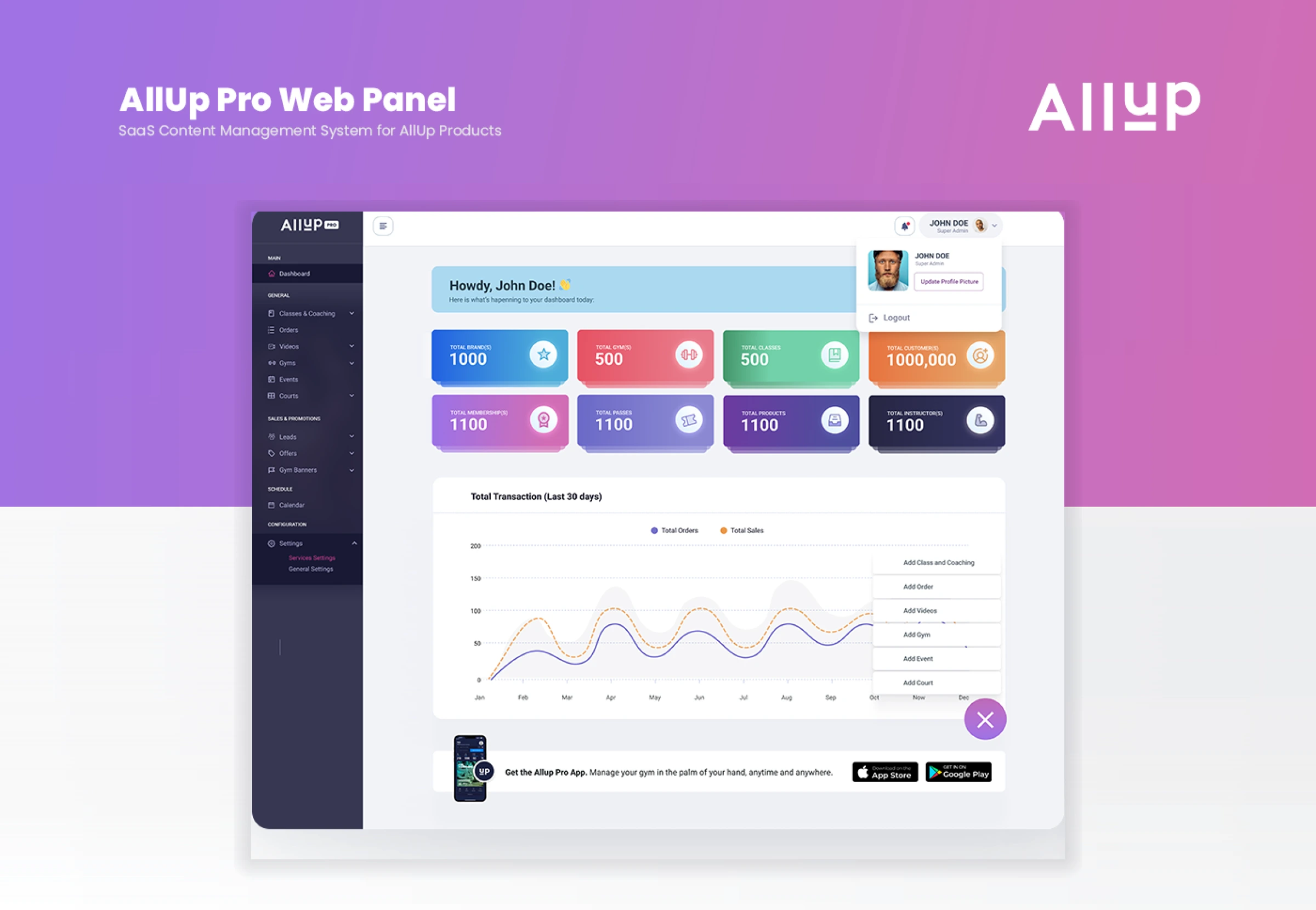
Dashboard & real-time KPI analytics
8-metric executive command center for gym owners
The Dashboard provides a comprehensive overview of key metrics and activities within the gym, allowing owners to monitor performance at a glance in a scannable two-row card grid:
- Row 1 Core Network KPIs: Tracks Total Brands (1,000), Total Gyms (500), Total Classes (500), and Total Customers (1,000,000) with distinct color-coded gradient cards.
- Row 2 Revenue & Catalog KPIs: Surfaces Total Memberships (1,100), Total Passes (1,100), Total Products (1,100), and Total Instructors (1,100) for instant operational auditing.
- Personalized Daily Briefing: Greets operators ("Howdy, John Doe!") with live notification badges and one-click sidebar collapsing.
30-day transaction analytics, quick-add launcher & mobile sync
Below the KPI grid, the Dashboard pairs financial trend visualization with rapid creation shortcuts and cross-platform app continuity:
- Total Transaction (Last 30 Days) Chart: Plots Total Orders (solid purple spline) against Total Sales (dashed orange spline) from Jan to Dec to highlight seasonal revenue peaks.
- Floating Quick-Add Action Menu: Clicking the purple (+) launcher lets admins immediately Add Class and Coaching, Add Order, Add Videos, Add Gym, Add Event, or Add Court.
- Get the AllUp Pro App Banner: Connects the web panel with the iOS App Store and Google Play companion apps to manage the gym anytime, anywhere.

Fitness Calendar & Lead Management CRM
Fitness Calendar & guided class / trainer setup
The Fitness Calendar helps gym owners and members stay organized with a clear view of all scheduled classes, training sessions, and events—paired with a step-by-step setup flow:
- Color-Coded Weekly Schedule Grid: Displays Yoga Class, MMA Class, and 1-on-1 Sessions with Ronnie across daily time slots with instant brand, gym, and instructor filtering.
- Class vs. Personal Trainer & Onsite vs. Online: Right-hand configuration cards let admins choose the service type, delivery mode, and Single vs. Recurring schedule in seconds.
- Granular Slot & Trainer Assignment: Configures Start/End Date, active weekdays (Mon, Wed, Sat), duration in minutes, available slots, and assigned trainers (e.g., Ronnie Coleman, Jay Cutler).
Lead Page CRM, pipeline KPI filters & 360° member timelines
To turn prospective gym visitors into paying members, the Lead Page centralizes inquiry tracking, status filtering, and follow-up history in one CRM workspace:
- Interactive Lead Pipeline Cards: Segments 150K Total Leads into Pending (1,200), Interested (320), Subscribed (500), and Cold Leads (600) for targeted sales outreach.
- Advanced Search & Multi-Facet Filtering: Purple-framed filter popover isolates leads by Lead Source, Lead Status, Assigned Agent, and Date Range.
- ° Lead Profile Modal (Alex Ariza): Opens a rich tabbed profile covering Details, Activity Timeline, Follow-Up tasks, Memberships, Orders, and Bookings.


Point Of Sales (POS) & retail checkout
Competitor-informed POS UX & visual supplement catalog
I conducted thorough research on competitor POS screens, analyzing their features and performing SWOT analysis to identify market trends. Using these insights, I designed an intuitive UX/UI framework tailored for AllUp’s POS system:
- Category Icon Ribbon & Brand/Gym Filters: Top category tiles (Supplement, Merch, Machine, Vitamins) and Brand/Gym dropdowns let front-desk staff filter inventory in one click.
- Visual Product Cards with Live Stock Badges: Displays Creatine Micronize (AED 100.95) and Impact Whey Isolate (AED 165.00) with "In Stock: 100" indicators and a large (+) quick-add overlay.
Walk-in / member cart & dual-mode payment modal
The right-hand cart and checkout modal streamline over-the-counter transactions so staff can serve walk-in guests and registered members without delay:
- Searchable Customer Selector & Live Cart: Assign the order to a Walk-In Customer or search registered members (e.g., Michael Keator, Muhammad Ali, Alvin Patrimonio, Elvis Presley) with automatic Discount, Sub Total, and Tax (1.5%) calculation.
- Choose Payment Method Modal: Tapping "Place Order" launches a focused modal to select Pay with Cash or Pay with Credit Card and confirm "Pay Now (AED XX.XX)".

Class Booking & member check-in workflow
Steps 1–2: Calendar class drawer & searchable Clients directory
When a user clicks on an existing class from the calendar, the admin can effortlessly add specific clients by selecting "Book a Member" and choosing from the live client directory:
- Step 1 — Class Roster Drawer (0/10 Booked): Clicking "Yoga Class with Conor" opens the session drawer showing Members, Memberships, Paid, and Actions tabs alongside "+ Book a Member", "Edit this class", and "Delete this class".
- Step 2 — Instant Client Search Pop-Up: Typing "Alex A" in the Clients modal filters matching member profiles with one-tap "Book this Class" action pills.
Steps 3–5: VAT payment checkout, confirmation & attendance roster
Upon clicking "Book this Class", a payment methods pop-up appears, providing convenient options for completing the transaction and updating the live class roster:
- Step 3 — Proceed Payment Modal: Displays the class booking summary ("Yoga with Connor Mcgregor"), calculates VAT (5%), Subtotal, and Line Total, and processes payment.
- Step 4 — Purchase Confirmation State: Presents a clear green checkmark modal ("You have successfully Purchase Alex a Class") confirming that the confirmation email has been dispatched.
- Step 5 — Updated Live Roster & Attendance: Immediately lists Alex Ariza and Michelle Broch under the class roster with green Paid checkmarks and inline actions to Mark Attendance or Remove from Class.

Class Attendance Report & system pages
Multi-series Class Attendance Report & utilization analytics
The Class Attendance Report provides detailed insights into class participation, helping gym owners track attendance trends, identify popular classes, and make informed staffing decisions:
- -Parameter Report Filtering & Summary Tabs: Filter by Start Date, End Date, Brand, and Gym across Class Summary, Trainer Summary, and Daily Report tabs.
- UFC Gym Classes Combined Bar & Line Chart: Visualizes monthly class volume alongside multi-category trend lines with one-click Download Report and Refresh Data actions.
Cohesive multi-screen SaaS ecosystem (Pages showcase)
Beyond core scheduling and reporting, AllUp Pro extends the same clean design system across every administrative and financial module in the platform:
- Settings, Activity Logs & Trainer Summaries: Includes General Settings, audit-ready User Activity Logs, and dedicated Trainer Summary profiles (e.g., Michael Flores).
- Regional Payment Gateways, Referrals & Email CRM: Supports Manage Cards (COC) and regional gateways (MasterCard, Upayment, Knet, Mada, Tamara, Tabby), Member Referrals tracking, and an integrated Compose Email tool.

